Mistress Of The Dor Kness

  • Subscribe to our RSS feed.
  • Twitter
  • StumbleUpon
  • Reddit
  • Facebook
  • Digg

Monday, 10 October 2005

Block Thumbnails and Block Names with Wildcards

Posted on 11:26 by Unknown
First an answer, then a question...

Thumbnail images for blocks are not displayed in AutoCAD® DesignCenter
Published date: 2003-03-06 ID: TS34512
Applies to: AutoCAD® 2002AutoCAD LT® 2002AutoCAD LT® 2000iAutoCAD LT® 2000
Issue
Thumbnail images for blocks do not display in AutoCAD DesignCenter for drawings created in previous versions of AutoCAD or AutoCAD LT® software.
Solution
Blocks created in older versions of AutoCAD or AutoCAD LT do not store a preview or thumbnail of the block in the drawing. Instead, you must use the BLOCKICON command to save a thumbnail image for blocks.Enter BLOCKICON on the command line. Press ENTER. Enter an asterisk (*) to update all blocks, or enter the name of the block you want to update. Press ENTER. The number of updated blocks is displayed on the command line.

Now, for the question...
Renaming blocks with wildcard characters
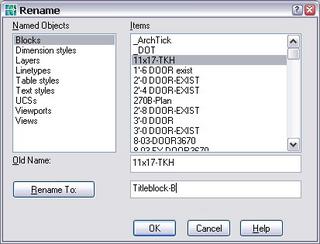
I'm doing some drawing cleanup, drawings have been modified with different programs such as ADT, etc. I've done some flattening, translating, exploding, etc. I have design center open, and am using the RENAME command to relabel the blocks to things that make sense.
I noticed that there were some blocks named, eg, *E535. They showed up in the RENAME dialog box, but, not in Design Center. So, I used rename to remove the asterisk, then they showed up in DC preview just fine so I could see what they looked like and rename them accordingly.
BUT! while there were a few of those that have shown up, I was moving around the drawing and saw some objects with block names of eg. *U174, etc but they show up neither in the DC nor the RENAME dialog.
Why is that? And, how can I get at them to rename them easily?
Anyone have an answer/solution/work-around for me?
Read More
Posted in Autocad | No comments

Friday, 7 October 2005

Using a Block to Trim

Posted on 13:28 by Unknown
Btrim

have a great weekend, and thanks to my better half for the above.

oh, and some interesting reading: http://www.miniature-earth.com/
If we could turn the population of the earth into a small community of 100 people, keeping the same proportions we have today, it would be something like...
Read More
Posted in Autocad | No comments

Monday, 3 October 2005

Salary Survey

Posted on 09:58 by Unknown
CAD Salary Survey - Designers, Drafters, Engineers, Architects & Educators!
The AUGI Annual Salary Survey is now running!
The results will be published in the Jan/Feb 2006 issue of AUGIWorld magazine.
You do have to be a member to take the AUGI salary survey, but, it is a free membership and they don't sell your information to other parties. Don't forget to set your preferences in the My AUGI control panel, which determines whether you get hotnews and other AUGI updates via email.

The results of past Salary Surveys (among others) can be found on the Surveys Archive page. Please give your input in this anonymous survey, to give validity and ensure accuracy to our survey results.

I volunteer as the Survey Manager for AUGI, and I've held this position since this time last year. This announcement is not an official announcement of AUGI's, it's just something that I thought would benefit the user base from my perspective.
Last year I got quite a few questions about the survey and answered them as best I could, and I thought I'd share some of them here.

Privacy:
The survey results are not tied to your user name, and the results are not sold or given to any other entity, and results will only be given by wide groups and categories.

Currency:
The currency is in US dollars only for simplicity's sake. This year we have included a link to a site which will convert other currencies so non-US residents can easily participate.

What does Salary Include?:
This question came up a few times. The conclusion is that your salary should include your base pay plus bonuses, commissions, and overtime.

Salary Increase?:
Also, we have added the option of noting whether your salary has decreased (in previous surveys we only asked if it had increased or stayed the same).

Discipline:
We've tried to cover a wide-variety of disciplines, but, at the same time, we want to have meaningful results so don't want to get overly specific. The more respondents we have, the more we can break down the information in future surveys.

Job Title:
This one is a biggie! I know! that you do more than one job. You might do drafting, cad management, IT, training, etc, but, my assumption is that your pay is going to reflect your actual job title and how your company classifies that, not necessarily all of the additional things that you do, so, please just select the one job title that most closely matches your own.

Size of Company/Size of Department:
This got a few comments last year, when we asked how many employees does your company have? I'll admit I thought about it too. For instance, I work in a company of 20,000, but, there are less than 10 CAD users. So, this year, we have separate fields for size of company and size of department.

Please, pop up to the site and take 2 minutes to fill out this survey to make the information that AUGI provides to you more accurate and useful.

Browser: I have been told that Firefox and some other browsers don't work to take this survey. If you are using another program, please send your feedback to surveys@augi.com. I'd like to hear what you do use and whether or not this will actually affect your taking the survey.

Thank you!

Read More
Posted in | No comments

Friday, 30 September 2005

MAP2006 Service Pack and New DWG Viewer from Autodesk

Posted on 11:23 by Unknown
From the MAP General Discussion Forum: MAP 3D 2006 Service Pack
In a continuing effort to provide high-quality products, Autodesk has released Autodesk Map 3D 2006 Service Pack 1, which includes fixes or addresses issues for Autodesk Map 3D 2006.http://usa.autodesk.com/adsk/servlet/ps/dl/item?siteID=123112&id=5967985&linkID=2786655
The following is a list of features affected by this service pack:
  • Connecting to ArcSDE
  • External Databases
  • Display Manager
  • Globalization
  • Topology
  • Import/Export
  • Query
  • Oracle
  • Performance
  • Image
  • Civil 3D
Regards,Tom Bradley - Autodesk ISD Product Support

http://forums.augi.com/forumdisplay.php?f=70

From the CAD Manager's Discussion Forum: DWG Viewer

http://discussion.autodesk.com/thread.jspa?threadID=428602
Some users are reporting that they have gotten press releases from their local resellers announcing a new free DWG viewer from Autodesk. But, there is nothing on Autodesk's site, or any official announcements so far.
Read More
Posted in Applications, Autocad | No comments

Tuesday, 27 September 2005

Printing only a portion of a pdf from Acrobat Reader

Posted on 09:59 by Unknown
Adobe Acrobat Reader (verified on versions 6, 7, 8 & 9) tips for printing a portion of a pdf page.

Typically, if I only wanted to print a portion of a page, I would use the 'Snapshot' tool to capture an image of the desired area and paste it into another program for printing (such as photo editor or a word processor).


But! did you know that you can use the 'Snapshot' tool (under Tools > Select and Zoom) to capture part of the page then, when you pull up the print dialog, you will see under the 'Print Range' group, the option for 'Selected Graphic' (not normally available in the dialog box). 


You can then choose 'None' for 'Page Scaling' or expand the selection to 'Fit to Paper', depending on your needs.

This does NOT work for the 'Select Text' tool.

Also, from Adobe Standard 6 Help:
To convert each image in an Adobe PDF document to an image file format:

1. Choose Advanced & Export All Images.
2. In the Export All Images As dialog box, choose the image type for Save as Type (Windows) or Format (Mac OS).By default, the source filename is used as the filename with the image file type appended.
3. Click Settings.
4. In the Save As Settings dialog box, select the conversion, color management, and file settings for the file type. (See Converting to JPEG or JPEG2000 format, Converting to PNG format, and Converting to TIFF format.)
5. For Exclude Images Smaller Than, select the smallest size of image to be extracted. Select No Limit to extract all images.
6. Click OK, and in the 'Export All Images As' dialog box, click 'Save' or 'OK'.
Read More
Posted in Applications | No comments

Friday, 23 September 2005

RENAME? What's that?

Posted on 11:12 by Unknown
Alright, after 10 years of using Autocad, I KNOW I don't know everything, but, man, sometimes you're just surprised with something and go 'how could I NOT know about that yet?!?!'
Well, big news, it happened to me (yet again). 


I wanted to rename an existing block, and used the help file (always the first course of action), but no joy searching for block & rename. So, I posted a statement/question on one of the discussion groups that I belong to. I was advised about 'save as', alright, no surprise there... but, then, Rick M mentioned the Rename command.

Now, there is something new! I refuse to believe that I'm the only person who hadn't heard of this, so, go ahead and try it!

Read More
Posted in Autocad | No comments

Thursday, 15 September 2005

neat commands and upgrading...

Posted on 10:28 by Unknown
BURST is used to Explode blocks with attributes. But, unlike explode, it will convert attribute values to their text equivalent (rather than to the attribute's prompt). Also, this command does not explode plines into lines or mtext to text.


In the right-click menu in MAP 3D 2006, when you have an object selected you can choose to 'select similar' objects to save you a lot of time picking by hand. This isn't ideal for every situation but has saved me loads of time. 

http://forums.augi.com/showthread.php?t=25652
Autodesk looking for 2002 to 2006 stories

I haven't been on since I got back from my trip, just have to say that I had a lovely time and it couldn't have gone any better. London and Dublin and the surrounding areas are really neat places. Enjoyed the people, the architecture, the food and, believe it or not, the weather. It was perfect the entire time I was there.
Read More
Posted in AUGI, Autocad | No comments
Newer Posts Older Posts Home
Subscribe to: Posts (Atom)

Popular Posts

  • Busca usted las respuestas a sus preguntas acerca de AutoCAD
    Busca usted las respuestas a sus preguntas acerca de AutoCAD, la Personalización, Revit u otros productos de Autodesk en su propio idioma? E...
  • Revit + 3dsMax: Utilizing Render Techniques - A Winning Combination
    It's been too long since I've had a guest post, so, I'd like for you to enjoy this rendering tutorial. I met Ryan on www.forums...
  • Mtext Line Spacing
    From AutoCAD Help: If you enter ‑mtext (precede with hyphen) at the Command prompt, MTEXT bypasses the In-Place Text Editor and displays a...
  • St. Louis Metro Storm Update
    Well, just felt like making another update about the storm. It's so odd that we're here in our nice powered home but so many things ...
  • MAP tool of the day - ADERSHEET (rubbersheet)
    from MAP3D 2006 help: ADERSHEET (Rubber Sheet command) Performs rubber sheeting on selected objects Rubber sheeting is a nonuniform adjustme...
  • All my tech support genius
    I have said it time and again, only slightly tongue-in-cheek, that all of my most appreciated 'genius' moves are attributed to these...
  • VTENABLE and my new Scanner (mfp) is here!
    VTENABLE system variable (from autocad help) Controls when smooth view transitions are used. Smooth view transitions can be on or off for pa...
  • Autodesk MAP 3D 2007 Service Pack 1 Available
    Service Pack 1 has come out for MAP 2007 . I must admit that I was waiting for this before I installed. I'll post here like I did last y...
  • Very Valuable Variable: REMEMBERFOLDERS
    From the autocad help files: REMEMBERFOLDERS - Controls the default path displayed in standard file selection dialog boxes. 0 Restores the ...
  • 2006 System Variables D-L
    Continuing from yesterday's posts, From the help files... 2006 system variables beginning with the letters 'D' through 'L...

Categories

  • ACA
  • Alternative Energy
  • AMEP
  • Applications
  • AU2006
  • AU2007
  • AU2008
  • AUGI
  • AUGIWorld Magazine
  • Autocad
  • AutoCAD
  • Autodesk University
  • BIM
  • cad camp
  • CAD Camp
  • CAD/Design Salary Survey
  • CAFM
  • Database
  • Education
  • Engineering
  • Facilities Management
  • FMDesktop
  • funny
  • GatewayAUG
  • Hardware
  • HotNews
  • Job Opening
  • Media
  • off-topic
  • Revit
  • RMEP
  • St. Louis
  • Tutorials
  • Women In Design
  • Writing

Blog Archive

  • ▼  2013 (27)
    • ▼  November (3)
      • All my tech support genius
      • Uni: The end of the story
      • Revit + 3dsMax: Utilizing Render Techniques - A Wi...
    • ►  September (1)
    • ►  July (1)
    • ►  June (16)
    • ►  May (2)
    • ►  April (1)
    • ►  March (2)
    • ►  February (1)
  • ►  2012 (14)
    • ►  December (2)
    • ►  November (4)
    • ►  September (1)
    • ►  August (1)
    • ►  July (1)
    • ►  May (1)
    • ►  March (1)
    • ►  February (1)
    • ►  January (2)
  • ►  2011 (22)
    • ►  November (3)
    • ►  October (3)
    • ►  September (3)
    • ►  August (2)
    • ►  July (1)
    • ►  May (7)
    • ►  April (1)
    • ►  March (2)
  • ►  2010 (16)
    • ►  December (2)
    • ►  November (5)
    • ►  September (1)
    • ►  August (1)
    • ►  July (2)
    • ►  April (1)
    • ►  March (1)
    • ►  February (2)
    • ►  January (1)
  • ►  2009 (15)
    • ►  October (1)
    • ►  July (1)
    • ►  June (4)
    • ►  April (2)
    • ►  February (7)
  • ►  2008 (58)
    • ►  December (1)
    • ►  November (1)
    • ►  October (1)
    • ►  September (3)
    • ►  August (4)
    • ►  July (7)
    • ►  June (4)
    • ►  May (5)
    • ►  April (4)
    • ►  March (10)
    • ►  February (9)
    • ►  January (9)
  • ►  2007 (69)
    • ►  December (7)
    • ►  November (9)
    • ►  October (6)
    • ►  September (3)
    • ►  August (1)
    • ►  July (5)
    • ►  June (4)
    • ►  May (4)
    • ►  April (3)
    • ►  March (9)
    • ►  February (11)
    • ►  January (7)
  • ►  2006 (121)
    • ►  December (7)
    • ►  November (8)
    • ►  October (10)
    • ►  September (13)
    • ►  August (16)
    • ►  July (14)
    • ►  June (14)
    • ►  May (6)
    • ►  April (7)
    • ►  March (7)
    • ►  February (14)
    • ►  January (5)
  • ►  2005 (68)
    • ►  December (9)
    • ►  November (10)
    • ►  October (7)
    • ►  September (4)
    • ►  August (5)
    • ►  July (11)
    • ►  June (9)
    • ►  May (4)
    • ►  April (9)
Powered by Blogger.

About Me

Unknown
View my complete profile