Mistress Of The Dor Kness

  • Subscribe to our RSS feed.
  • Twitter
  • StumbleUpon
  • Reddit
  • Facebook
  • Digg

Friday, 20 April 2007

MISSING POSTS

Posted on 07:41 by Unknown
edit: all of my posts have been restored and the remainder of my blogs migrated thanks to the Blogger team. Woohoo! I love blogger. ~does snoopy dance~


IF YOU'RE LOOKING FOR MISSING POSTS...

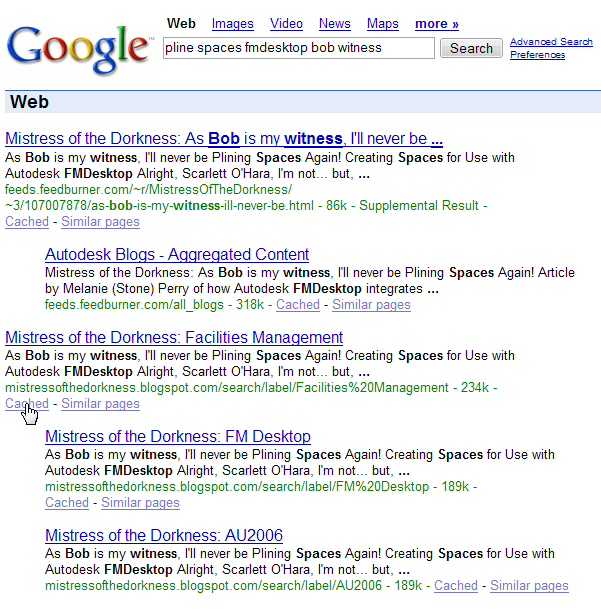
If you've found an article via google search, I recommend checking out the 'cache' link where you can see a saved image of the missing post (see below image)...
Still no word from Blogger support on why all of the posts since I migrated to the 'new' blogger have disappeared... ~grumbling~

If you are looking for a post, and the cache in google search doesn't help, please feel free to email me, and I will send you the contents of the post you're looking for... I do not have time to repost every article yet, although I intend to if the Blogger employees don't come through for me.
I apologize for any inconvenience resulting from broken links. :-(


It will be a couple of weeks before I can get to all of the reposting, I'm afraid; I am working on (technically editing) another book right now and have deadlines to meet.

*****

Alright... my blog was fine last night... (I think)... it was most certainly fine after I made my last post, as I saw DH reading it later...

I came to search for a link this morning and I see that my blog has been magically rolled back to January! So... all of my posts and my links and my lovely new colour scheme has gone POOF... I've got a question in with blogger support, hopefully they'll be able to fix whatever went wrong.

If they can't, I've got archives, and will hopefully be able to back up most of what I've lost.

~sigh~ Sorry if you're looking for something specific I've posted since then.

Cheers and have a lovely weekend.
Read More
Posted in off-topic | No comments

Sunday, 8 April 2007

Free and Updated Autodesk Products

Posted on 09:47 by Unknown
Where to start? This has been a busy few weeks for Autodesk announcements and I know I haven't kept you up to date, so be prepared for this little deluge below:

Design Review - View, measure, markup and print 2D and 3D designs for FREE.

DWG True View - View and plot DWG's and DWF's... PLUS now you can convert between different releases from R14 through 2008! (this functionality was previously offered in a different free download called True Convert)

Units Converter - don't forget about this nifty online tool.

ScriptPro
- Easy interface for scripting (apply a set of commands to many drawings).

AutoLisp Compatibility Analyzer
- searches for known compatibility issues in lisp files created for versions prior to r2004.

Approved Grapics Card List - See if your card is Certified, Supported and Recommended, Supported and Not Recommended or Not Supported. (if you're ordering a new pc, send your IT guy up here first when selecting a card, they'll find their favorite brands and be able to tell which models will work)

AutoCAD LT 2007 SP2 - I believe this is the service pack that helps LT07 work with Vista. Don't forget to read the notes. Still install even if you're not using Vista... there are a lot of other fixes in here as well that you won't want to miss.

AutoCAD 2007 SP2 and other updates - Check out the whole list here and make sure you've got everything you need. From Vista to Copy/Paste bug, to Activation Errors, OLE errors, Regenerating Text, Fatal Error During Save, Closing Drawings, etc...


FMDesktop - There are a few updates here, but, I wanted to point out some recent compatibility discussions:
Facility Link with AutoCAD 2008 - Installation problem, patch is not yet available.
FM Desktop with MS Access 2007 - Some bugs with saves in forms, does not affect the data; patch is not yet available (I'm sticking with Office 2003 for now, just to be on the safe side).
FMDesktop with Revit Systems 2 (Revit MEP) - Cannot import spaces or plan views from RSys (RMEP) into Facility Manager at this point. Product teams communicating and working on future compatibility.
Read More
Posted in Applications, FMDesktop | No comments

Sunday, 1 April 2007

AUGI Forums Updated for Autodesk 2008 Products

Posted on 21:00 by Unknown
Well, there have been some updates going on over at AUGI.com discussion group, thanks to the tireless work of the Forum Manager, Mike Perry.

The AutoCAD Community Team had a little hand in our corner of the world.
That would include Kris Keller, the AutoCAD Community Chair, along with Ed Jobe and myself as the AutoCAD Community Forum Managers.


You can check out BLAUGI for a short list of the changes that have been made.

*****
There have also been some changes with the Media and Entertainment forums (aka, the Design and Visualization forums), so be sure to check those areas out, too.

A note on AutoCAD Architecture and AutoCAD MEP 2008 forums... they will be updated once the products are officially released. ;) So, don't feel left out if you don't see anything new in there quite yet, you haven't been forgotten, the ADT/ABS (erm, ACA/AMEP) team is hard at work.
*****

One thing definitely worth mentioning about the AutoCAD Community forums is the expanded coverage of Dynamic Blocks!!! We've recently added two new moderators to the team, Chris and Rico (aka, Dynamic Blockheads) who've done A LOT of work to organize all of the free AutoCAD Dynamic Blocks that the amazing augi community has been making and collecting.

You can ask your dynamic block questions
here.

And you can download blocks from this forum, an extensive library well classified (search the labels for Annotation, Architectural, Civil, Electrical, Manufacturing, Mechanical (hvac), Plumbing, Structural and Miscellaneous.).

Be sure to pop up there to check them out, download some blocks and give them a try; heck, you might even want to post one or two nifty creations of your own.
Read More
Posted in ACA, AMEP, AUGI | No comments

Wednesday, 21 March 2007

Report from the Gateway AUG Tips and Tricks Meeting

Posted on 19:31 by Unknown
Tuesday, March 20th, another quarterly meeting of the Gateway AUG.

We gathered again for some pizza, tips and tricks, and good nerdy discussions.
We spoke about the new product naming schemes for '2008' Autodesk software and talked about some of the changes in the Autocad-based product line. You've already read about my highlights from this version in a previous post, so I'm going to share the AutoCAD Tips and Tricks (applicable to earlier versions). Some of these tips have already been posted on this site, but, I hope you won't mind reading them again.


To
dock and 'stack' your palettes and your dashboard in a collapsed state, just right click on the palette or panel title and select the option to 'Dock Left' or 'Dock Right'. You can put as many as you want on one side and still be able to access them.

To
Prevent Docking, move your palette while holding down the Ctrl key.

Keyboard Navigation
Use Alt-Tab to switch between open files and programs

Use Ctrl-Tab to switch between open AutoCAD files

Use Ctrl-PageUp or PageDwn to cycle between layouts/modelspace (PageDown to move right, PageUp to move left)

Use Ctrl-R to cycle through active viewports


Making a missing toolbar reappear

You know that toolbar is on, you just can't quite find it and suspect it has been drug offscreen.
Command: -toolbar (note the '-' hyphen before the command name)
Toolbar name (or ALL): "toolbar name" (eg. "Properties" <-use quotations around name) Show/Hide/Left/Right/Top/Bottom/Float: : f (to show it in the middle of your screen somewhere) Position <0,0>: 300,300
Rows <1>: 1
and voila'!

OOPS, I undid it again...
OOPS looks for the last entities erased and restores them (without undoing any pans, zooms, other edits done since the erase).

A Clean Background Check

WMFBKGND from AutoCAD Help:
This System Variable controls the background display when objects are inserted in Windows metafile (WMF) format. The objects may be inserted using any of the following methods:
• Output to a Windows metafile using WMFOUT

• Copied to the Clipboard and pasted as a Windows metafile
• Dragged as a Windows metafile Off The background color is transparent.
The foreground color depends on the setting of WMFFOREGND.
On
The background color is the same as the current background color in the drawing, whether in model space or in a layout.
The foreground color remains unchanged.


T
urn it up… or sideways
Did you know that you can type “R” when using “Paste” to pre-select the rotation angle of the objects to be pasted?


Leggo my Design Center

Do you know you’ve created a block, but, just can’t remember where you put it?
You can use the Search option in Design Center to locate it.
That’s not all you can Search for… try it with BLOCKS, DIMSTYLES, DRAWINGS, HATCH PATTERNS, LAYERS, LAYOUTS, LINETYPES, TEXTSTYLES and XREFS.

Say, for example, that you just want to find out where your drawing is being referenced, you can use this method to find where it shows up as an XREF.

Super Freak-y Hatches!

Check out the Express Menu (Express Tools are a separate exe file from AutoCAD, so make sure you’ve installed them!), under Draw and Superhatch!
You can make a hatch from images and blocks, which could be a cool way to apply your company logo to objects in your drawing.

Mind the Gap
HPGAPTOL System Variable sets the allowable distance between objects that are accepted as a hatch boundary. You can find the “Gap tolerance” on the “Advanced” tab of the BHATCH dialog box.
From AutoCAD Help:
Treats a set of objects that almost enclose an area as a closed hatch boundary. The default value, 0, specifies that the objects enclose the area, with no gaps.
Enter a value, in drawing units, from 0 to 5000 to set the maximum size of gaps that can be ignored when the objects serve
as a hatch boundary.

Attached to your method of Xref’ing?

A variable was introduced in r2005 that allows you to set your default XREFTYPE.
Set it to “0” for a default of “Attach” or set it to “1” for a default to “Overlay” your XREF’s.


Take your Drawings to Task

Command entry: TASKBAR
Enter new value for Taskbar <0>:
Enter 1 to display multiple open drawings as separate items on the Windows taskbar

The default setting, 0, displays only the name of the current drawing on the Windows taskbar.


A Layer by any other Name
Would not be according to standard. Don’t forget about the nifty RENAME command, which allows you to easily change the names of blocks, layers, textstyles, etc.


Quick Draw…

f you want to be quick on the draw, don’t forget the QSELECT command… you can pick out many entities from a certain layer, or a certain block, no matter which layer it is on, text or mtext objects, etc to create a selection set for editing and applying properties.

If you're only selecting one object with QSELECT (such as a room number, parcel number, underlay ~dwg, dwf, dgn~), you can then, with that new selection set active zoom in to that object with a simple Z E <>.

We also mentioned the fact that, starting with AutoCAD 2007, the nifty LAYMRG (that's sort for Layer Merge) command was moved from the Express tools menu to core autocad and can now be used with a dialog.

We reviewed the LAYISO/LAYUNISO (layer isolate/layer unisolate) tools (both the legacy on/off behaviour and the newer lock and fade behavior).

We published a DWF with! the publish options set to include layer information.

The attendees all asked great questions that opened up new discussions and demonstrations that were really cool. We had the pleasure of meeting new people and of seeing regulars.

We did have enough swag, so that every attendee was able to leave with a little something. The handouts, food and drink were sponsored by Seiler Instrument, two software packages and some cool toys were donated by www.gatewayaug.com website hosts CADopolis, t-shirts, hats, laptop bags and various tech toys were collected by Mike Perry (Civil/Structural CAD Tech extraordinaire'), handouts and tips/tricks booklets provided by Melanie Perry, President (yours truly).
We also had a chuckle with a user who had won a mini Red Swingline stapler (ala Milton from Office Space) at the last meeting.

Registration for the St. Louis CAD Camp in September is not yet open. The CAD Camp website lists a date of September 18th, so check there for final confirmation of when it is... but! prepare your budget now, because you won't want to miss it.
You can also see a listing on Autodesk's website, and that of local CAD Camp sponsors, Hagerman. According to the Adesk website, the event will be held at St. Louis University in Busch Student Center on North Grand.
Read More
Posted in AUGI, AutoCAD, GatewayAUG | No comments

Sunday, 18 March 2007

Microsoft Event In St. Louis

Posted on 09:16 by Unknown
This product launch event actually took place in late February, and I'm just a big slacker for taking so long to share it with you. (you can find microsoft events here)

This 'tour' of theirs was called Microsoft Across America Launch Event. Registration was free. You could sign up for different 'tracks'. DH chose IT, and I chose Small Business. There were two four-hour demonstrations, but, we only took the morning tracks.
The Small Business track was dedicated to showing tools in the new Office 2007 and how they could improve the day to day office tasks.

It was held at the Adam's Mark Hotel. Lovely.
PARKING WAS A NIGHTMARE. Of course the hotel's parking lot was full, so we were directed to a nearby parking garage... which had THE. MOST. CONVOLUTED. design and the most inadequate signage ever. We finally found a spot and found our way out of this strangely long and twisted building, and walked back a couple of blocks to the hotel. Once inside the Adams Mark, there were clear signs directing us up a couple of levels to where the meetings were taking place.

There were some lovely pastries and fruit out for breakfast, as well as coffee and soda. There was plenty for everyone, despite the warning during registration that it was first come first served, so don't count on being able to get any.

Things were getting started a couple of minutes late, I'm sure because we were NOT the only ones who'd had hassles with the parking, so many of the attendees got there after the designated start time.

There were some vendors with booths scattered around, flanking the registration desk; but, nothing too in-your-face.

Registration was quick and painless, we were given a bag with a t-shirt, product and event flyers, and a small token which we could exchange after class for... a free copy of MS Office. Not demo mode, not 90 days only... but, as long as it resides on that hard drive, it's free to you. (believe it or not, I heard many people whining about the fact that you couldn't reinstall if you wiped your hard drive. boohoo, it's free, be happy for the time you've got it! I will be... I haven't installed yet because I knew I was wiping my pc soon... likely next weekend.)

There were A LOT of people there, a couple hundred per class, with three classes running concurrently. During the four hour class, we broke about 3 times, and they staggered it nicely so there wasn't a huge rush on the restrooms and beverage stations.

So, seeing Windows Vista in action during this MS Office Demonstration, I am impressed by the improved search. I use Windows search A LOT in XP, and while it is MUCH better than 2000, it's still a pain at times. Very, very nice search, previewing, etc.

I've been reading a lot about 'ribbons' over the past few months and had just assumed it to be a marketing buzzword, that, quite frankly, I was tired of hearing. I had no need to tie up my hair.
But, once I saw what they were talking about (basically, context sensitive tabs with commands and options), I thought it was a good thing. Heck, ANYTHING has to be better than those annoying cascading menus in Office 2003.

You can find tips for navigating the ribbon in Access, Excel, Word, Powerpoint and Outlook on this page.

Overall, a decent use of half a day and a decent way to see the new OS and Office Suite. The speaker was really good. There were a couple of glitches, but, he made them work and got a few laughs out of us ('Well, I think NOW would be a good time to demonstrate file recovery!')
Note, if I wanted the presentation powerpoint, we were expecting a link via email, but, I never got one, and evidently others didn't either, so you can download the file here.

The speaker, Greg, did mention a couple of free software applications from Microsoft; which can be upgraded to paying versions, if necessary. One of the programs I was familiar with, as I downloaded it last fall and taught myself the ins and outs, all the while being impressed at the extensive tutorials and help files and forum activities... and that program would be SQL Server Express. He also mentioned Office Accounting Express, which I hadn't heard of. I haven't tried this one out myself, as I really haven't had the time lately, but, I'd like to. Given my background in Accounting, I think it wouldn't hurt to keep myself apprised of related programs (back when I worked as an Account Temp in high school, we didn't use computer programs, everything was handwritten and calculated).
Read More
Posted in Applications | No comments

Friday, 16 March 2007

Reminder: Gateway AUG Tips and Tricks Meeting in St. Louis

Posted on 12:43 by Unknown
Just wanted to remind those in the St. Louis/Metro area that there will be an AutoCAD Tips and Tricks meeting on Tuesday the 20th, starting between 6 and 6:30pm.
This is general stuff, not discipline-specific, so hopefully there will be something for everyone.
Seiler Instrument is buying us pizza, drinks and meeting handouts (we like to take those tips and tricks home, don't we?).
We'll also be giving away plenty of door prizes, from toys, to tech, to t-shirts and software. Come on down and try your luck.


The meeting is at
Vatterott Technical College.

We're in the midst of planning our next meeting. It will be a panel discussion on Building Information Modeling, which promises to be pretty stimulating conversation.
Thanks to the efforts of the amazing Rudy Beuc, we already have a date and a location scheduled!

June 19, 6:00 - 8:30 (as always, we start congregating at 6:00, but, might wait until 6:30 to get started, we know how it is getting away from work at that time of day)
the Masonry Institute
1429 S Big Bend
St. Louis MO 63117

As usual, we will provide food and drinks, so come straight from the office if you need to.
Hope to see you there!

And, to all of the Irish (and those that celebrate with u
s), Happy St. Patrick's day...

I leave you with a shot of Ty this morning in his straight-from-Eire gear...
Read More
Posted in BIM, GatewayAUG | No comments

Saturday, 10 March 2007

AutoCAD 2008 - Customizing a Dashboard Panel

Posted on 20:04 by Unknown
As I mentioned in my previous comments about AutoCAD 2008, I am enjoying the Dashboard Panels. I have to admit that the only thing I really use Tool Palettes for is block insertions, and while the Dashboard might seem slightly similar... it's really a cool combination of the best in Tool Palettes and Toolbars.

In my work as a Facility Manger, I 'clean up' a lot of drawings, so I'm going to create a Dashboard Panel with my favorite simplification and cleanup tools on it.

So, have your Dashboard open and right-click on an existing panel to get your shortcut menu and select the option 'Customize panel...'
When the CUI opens, you'll probably want to click the little arrow in the lower-right corner to expand the dialog to show all panes.

In the upper-left pane 'Customizations in all CUI files', right-click on 'Dashboard Panels' to create a 'New Panel'. I've named mine 'Cleanup'.

When your 'Cleanup' panel is selected in the left pane, you'll see a preview and the properties of it on the left. You can now start dragging and dropping
commands from the 'Command List' (lower left-hand pane). Remember, you can narrow this list using the drop-down to target specific command groups (such as Edit, Draw and Modify). As this list is alphabetical, you can also navigate by typing a letter, which will move you to the beginning of the list of commands which begin with that letter (if you're taking awhile browsing through, don't forget to hit the 'Apply' button at the bottom every now and again to make sure you don't lose your work).

Not only am I using built-in AutoCAD commands, but, I'm also calling a couple of custom routines (such as Select Similar by Adam Wuellner and Fix Block by Owen Wengerd). There are also a couple of AutoCAD commands that didn't come with button images, so I quickly modified some existing images to use with each of these commands.

After I create and place all of these buttons under my Dashboard Panel, I can rearrange them in the 'Panel Preview' or in the list view on the left, just by dragging and droppi
ng.

The panels can come with separators. Anything placed below the separator line will only show up when expanded on the dashboard. So, I'm going
to move the tools I use less often down there.

Speaking of separators, some of the tools on my Row 1 can be generally grouped together by type of command. To break those up a bit, I will right-click between the command names under the Dashboard Panel and click 'Add separator' (just like you would on a toolbar). On the second row, I haven't got them grouped so purposefully, they're just organized in the order in which I most use them.

Since I anticipate using these particular tools quite a lot, I'm going to add them to my AutoCAD Classic workspace. In the CUI, I select the AutoCAD
Classic Workspace and the list shows up in the upper-right panel under the heading 'Workspace Content'. At that point, I can grab my Dashboard Panel and slip it in in the desired order with the other Panels assigned to that workspace. Now, every time I work using the AutoCAD Classic workspace, those tools will be brought up.

Otherwise, I could show that panel by right-clicking on the Dashboard to 'Control Panels'. You'll notice some are checked and some are not... so just check the ones you want to see and uncheck the ones you don't.

You might notice that the Dashboard Panels have icons, where mine doesn't yet. Those are there to help identify the panel for you... but, they're also there as a way to associate Tool Palette Groups with your panel (TIP: you cannot associate a Tool Palette Group until after you have assigned it an icon).

First, we'll assign an icon to our Cleanup Panel (see CUI image posted above). Just click on the Panel in the left panel, don't select any tools or buttons. You will see the Button Image pane over there on the left... simply choose an icon at this point and you've done it (it may seem so obvious that I am telling you how to go about this, but, I thought I should... simply because I couldn't figure it out for the life of me when I was trying it out and had to have it pointed out when I was lost).

Once I assign an icon to my panel, I can right-click on the Dashboard Panel's icon and access 'Tool Palette Group' and pick which tool palette I want to associate with it.

Now, when I'm working and using my 'Cleanup' tools, if I find I am in need of some other tools, I can just click on that icon to bring up the Palette Group of my choice.

Just one of those little timesavers that can save you a few clicks.
Read More
Posted in AutoCAD | No comments
Newer Posts Older Posts Home
Subscribe to: Posts (Atom)

Popular Posts

  • Busca usted las respuestas a sus preguntas acerca de AutoCAD
    Busca usted las respuestas a sus preguntas acerca de AutoCAD, la Personalización, Revit u otros productos de Autodesk en su propio idioma? E...
  • Revit + 3dsMax: Utilizing Render Techniques - A Winning Combination
    It's been too long since I've had a guest post, so, I'd like for you to enjoy this rendering tutorial. I met Ryan on www.forums...
  • Mtext Line Spacing
    From AutoCAD Help: If you enter ‑mtext (precede with hyphen) at the Command prompt, MTEXT bypasses the In-Place Text Editor and displays a...
  • St. Louis Metro Storm Update
    Well, just felt like making another update about the storm. It's so odd that we're here in our nice powered home but so many things ...
  • MAP tool of the day - ADERSHEET (rubbersheet)
    from MAP3D 2006 help: ADERSHEET (Rubber Sheet command) Performs rubber sheeting on selected objects Rubber sheeting is a nonuniform adjustme...
  • All my tech support genius
    I have said it time and again, only slightly tongue-in-cheek, that all of my most appreciated 'genius' moves are attributed to these...
  • VTENABLE and my new Scanner (mfp) is here!
    VTENABLE system variable (from autocad help) Controls when smooth view transitions are used. Smooth view transitions can be on or off for pa...
  • Autodesk MAP 3D 2007 Service Pack 1 Available
    Service Pack 1 has come out for MAP 2007 . I must admit that I was waiting for this before I installed. I'll post here like I did last y...
  • Very Valuable Variable: REMEMBERFOLDERS
    From the autocad help files: REMEMBERFOLDERS - Controls the default path displayed in standard file selection dialog boxes. 0 Restores the ...
  • 2006 System Variables D-L
    Continuing from yesterday's posts, From the help files... 2006 system variables beginning with the letters 'D' through 'L...

Categories

  • ACA
  • Alternative Energy
  • AMEP
  • Applications
  • AU2006
  • AU2007
  • AU2008
  • AUGI
  • AUGIWorld Magazine
  • Autocad
  • AutoCAD
  • Autodesk University
  • BIM
  • cad camp
  • CAD Camp
  • CAD/Design Salary Survey
  • CAFM
  • Database
  • Education
  • Engineering
  • Facilities Management
  • FMDesktop
  • funny
  • GatewayAUG
  • Hardware
  • HotNews
  • Job Opening
  • Media
  • off-topic
  • Revit
  • RMEP
  • St. Louis
  • Tutorials
  • Women In Design
  • Writing

Blog Archive

  • ▼  2013 (27)
    • ▼  November (3)
      • All my tech support genius
      • Uni: The end of the story
      • Revit + 3dsMax: Utilizing Render Techniques - A Wi...
    • ►  September (1)
    • ►  July (1)
    • ►  June (16)
    • ►  May (2)
    • ►  April (1)
    • ►  March (2)
    • ►  February (1)
  • ►  2012 (14)
    • ►  December (2)
    • ►  November (4)
    • ►  September (1)
    • ►  August (1)
    • ►  July (1)
    • ►  May (1)
    • ►  March (1)
    • ►  February (1)
    • ►  January (2)
  • ►  2011 (22)
    • ►  November (3)
    • ►  October (3)
    • ►  September (3)
    • ►  August (2)
    • ►  July (1)
    • ►  May (7)
    • ►  April (1)
    • ►  March (2)
  • ►  2010 (16)
    • ►  December (2)
    • ►  November (5)
    • ►  September (1)
    • ►  August (1)
    • ►  July (2)
    • ►  April (1)
    • ►  March (1)
    • ►  February (2)
    • ►  January (1)
  • ►  2009 (15)
    • ►  October (1)
    • ►  July (1)
    • ►  June (4)
    • ►  April (2)
    • ►  February (7)
  • ►  2008 (58)
    • ►  December (1)
    • ►  November (1)
    • ►  October (1)
    • ►  September (3)
    • ►  August (4)
    • ►  July (7)
    • ►  June (4)
    • ►  May (5)
    • ►  April (4)
    • ►  March (10)
    • ►  February (9)
    • ►  January (9)
  • ►  2007 (69)
    • ►  December (7)
    • ►  November (9)
    • ►  October (6)
    • ►  September (3)
    • ►  August (1)
    • ►  July (5)
    • ►  June (4)
    • ►  May (4)
    • ►  April (3)
    • ►  March (9)
    • ►  February (11)
    • ►  January (7)
  • ►  2006 (121)
    • ►  December (7)
    • ►  November (8)
    • ►  October (10)
    • ►  September (13)
    • ►  August (16)
    • ►  July (14)
    • ►  June (14)
    • ►  May (6)
    • ►  April (7)
    • ►  March (7)
    • ►  February (14)
    • ►  January (5)
  • ►  2005 (68)
    • ►  December (9)
    • ►  November (10)
    • ►  October (7)
    • ►  September (4)
    • ►  August (5)
    • ►  July (11)
    • ►  June (9)
    • ►  May (4)
    • ►  April (9)
Powered by Blogger.

About Me

Unknown
View my complete profile